Project setup#
Depending on the project type, corresponding configurations within the project files are still necessary:
Below are the recommended settings for GitHub projects that are required to use this GitHub workflow.
Settings check
For some groups of projects the settings described here are checked automatically every working day. See Settings check. Please set up new projects of these groups exactly as described here, otherwise the check fails.
Secrets#
Various secrets are required for the necessary GitHub actions. If the projects are combined in a GitHub organization, the secrets can be stored there centrally. The setup of the organization is described in Organization setup.
If this concerns only a single project, follow the instructions under Organization setup with the difference that the secrets are set directly on the project.
Manage access#
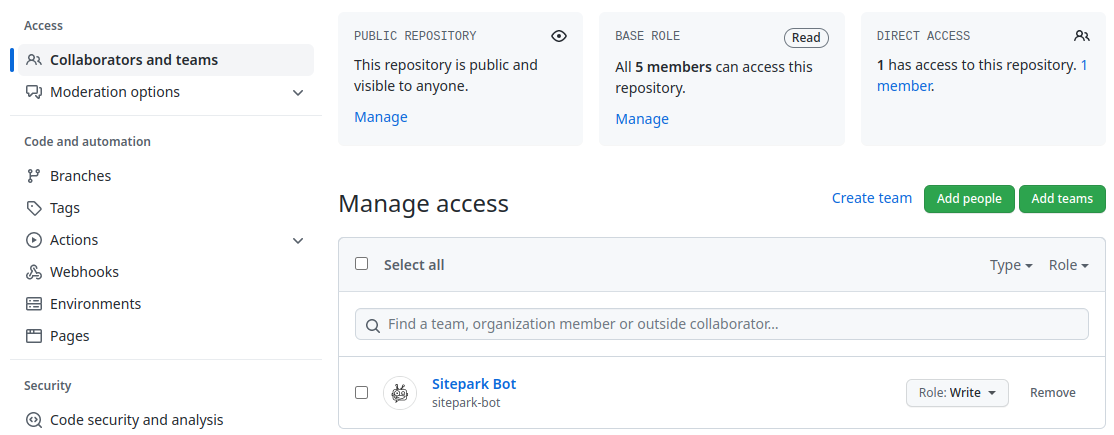
For automated actions, the team bots must have the admin role on the project. The only member of this team is the sitepark-bot.
The role is required for the following reasons:
- The release actions push to the protected
mainbranch, for which the team is a bypass actor. This alone would only require the write role. - The settings check runs with the token of the
sitepark-bot. Reading the branch protection and the security settings requires the admin role. - For composer projects, the
sitepark-botmanages the packagist.org webhook of the project, see Setup for composer projects.
Do not add the sitepark-bot to the project directly. It gets all permissions through the team bots.
Settings → Collaborators and teams → Add teams
General settings#
Settings → General
The default branch should be main.
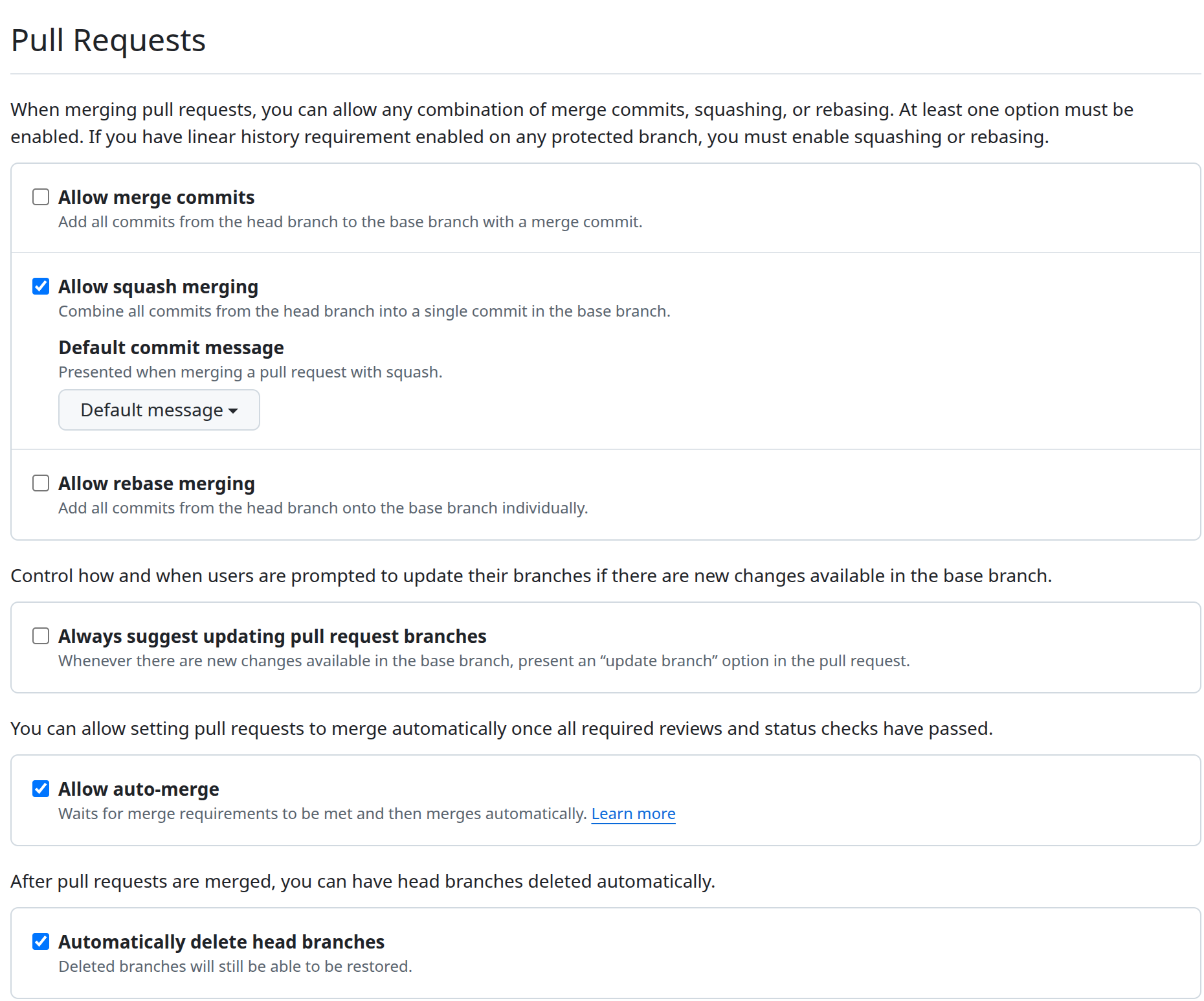
Under Pull Requests the following options are set:
| Option | Value |
|---|---|
| Allow merge commits | off |
| Allow squash merging | on |
| Allow rebase merging | off |
| Always suggest updating pull request branches | off |
| Allow auto-merge | on |
| Automatically delete head branches | on |
Pull requests are always merged with squash, so that each pull request results in exactly one commit on main whose message follows the commit conventions.
"Allow auto-merge" is required for the action (📡) Auto-Merge Dependabot Minor Updates.
main-Branch protection#
Settings → Branches → Branch protection rules → main
Require a pull request before merging#
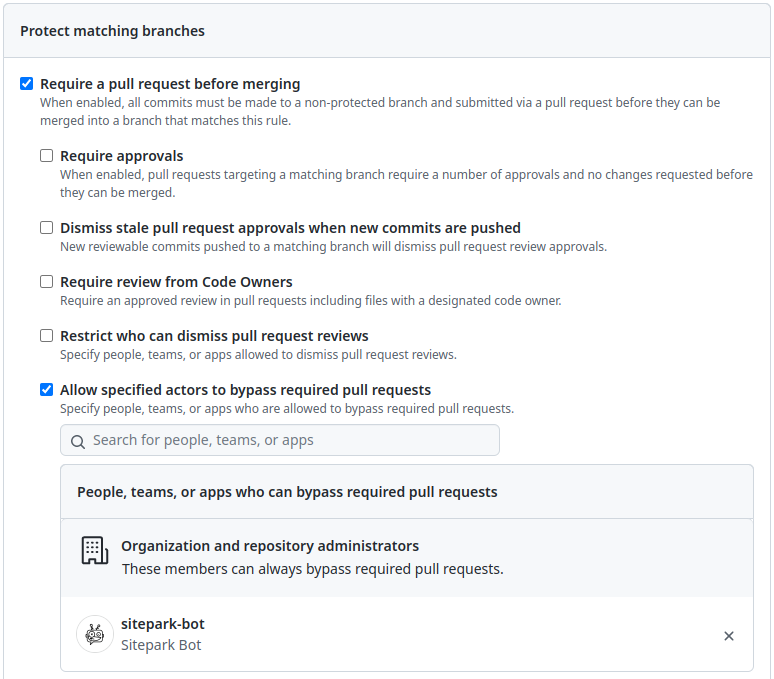
The main branch should not be committed to directly, but always via a pull request. For this, "Require a pull request before merging" is enabled.
- "Require approvals" is disabled, so that Dependabot updates can be merged automatically.
- Under "Allow specified actors to bypass required pull requests" the team
botsis added. This exception is required so that the release actions can push tomain.
Warning
GitHub only accepts a team as a bypass actor if the team has at least write access to the project (see Manage access). Otherwise the entry is dropped silently when saving.
Require status checks to pass before merging#
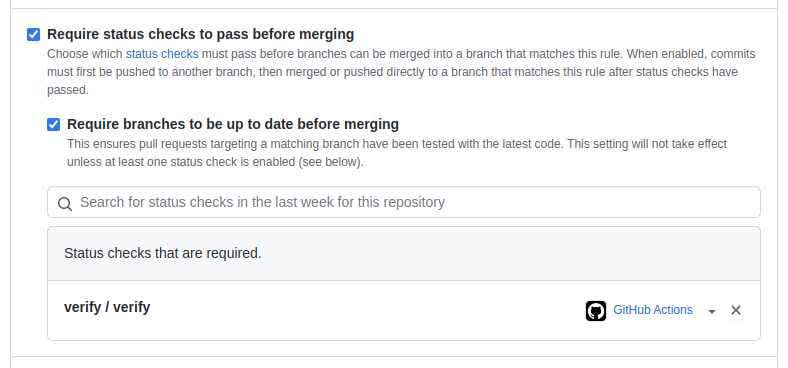
Branches should only be merged into the main branch if the GitHub action "Verify" has been executed successfully before. For this, "Require status checks to pass before merging" is enabled.
"Require branches to be up to date before merging" is disabled.
The status checks to be added depend on the project type:
| Project type | Required status checks |
|---|---|
| Maven | verify / verify |
| Composer | verify / Composer Verify (PHP x.y) for each PHP version in phpVersions of the verify.yml, e.g. 8.2, 8.3, 8.4 |
| JS | verify / verify |
A status check can only be added after the action has run at least once in the project.
Further rules#
"Allow force pushes" and "Allow deletions" stay disabled.
Security#
Settings → Advanced Security
"Dependabot alerts" (vulnerability alerts) is enabled.
"Dependabot security updates" creates pull requests for vulnerable dependencies automatically. It is enabled for the ies-* projects and disabled for the atoolo-* projects.
See also Dependabot.
GitHub Actions#
To verify, deploy and release the projects, GitHub Actions must be defined.
Depending on the type of project (Java/Maven, JavaScript/NPM, PHP/Composer), the corresponding actions must be created here.
There is a naming convention for the actions, which states that the name of the actions that must be triggered manually should start with (▶) and actions that are triggered automatically should start with (📡).
(▶) Create Release#
The release action creates a new release for one of the branches main, hotfix/* or support/*. See also branching model. This action is project type specific. It is started manually.
To create this action for the project the file .github/workflows/create-release.yml must be created in the project.
For the different project types, the corresponding action must be used:
(▶) Start Hotfix#
Creates a hotfix branch by specifying a version tag. This action is project type specific. It is started manually.
To create this action for the project the file .github/workflows/start-hotfix.yml must be created in the project.
For the different project types, the corresponding action must be used:
(📡) Create GitHub Release Draft#
When a new tag of the form [0-9]+\.[0-9]+\.[0-9]+ has been created, this action is triggered automatically. It creates a new GitHub release and sets the changelog based on the Git commits.
To create this action for the project the file .github/workflows/create-github-release.yml must be created in the project.
For the different project types, the corresponding action must be used:
(📡) Deploy Snapshot#
The build action is performed on each commit for the main branch only. The project is built, tested and checked using defined rules such as code style conventions. Upon successful completion, the artifact is deployed to a snapshot repository.
To create this action for the project the file .github/workflows/deploy-snapshot.yml must be created in the project.
For the different project types, the corresponding action must be used:
(📡) Verify#
The verification action is performed on every commit for every branch except the main branch. The project is built, tested, and verified against defined rules, such as code style conventions.
To create this action for the project the file .github/workflows/verify.yml must be created in the project.
For the different project types, the corresponding action must be used:
The jobs of this action are the status checks required in the branch protection.
(📡) Auto-Merge Dependabot Minor Updates#
This action is triggered automatically when a pull request from Dependabot is created. It automatically merges minor updates into the main branch if the verification action succeeds.
To enable this action in the project, create the file .github/workflows/dependabot-automerge-minor.yml.
It requires the following settings described above:
- "Allow auto-merge" is enabled (General settings).
- "Require status checks to pass before merging" is enabled and "Require approvals" is disabled (
main-Branch protection).
For all project types:
Dependabot#
Use Dependabot to keep the packages you use updated to the latest versions.
For the different project types, the corresponding .github/dependabot.yml must be used:
Settings check#
The workflow (🔍) Check repository settings of this project compares the settings of groups of projects with a target configuration every working day. Each file in repo-settings/ describes one group:
| File | Projects |
|---|---|
atoolo.json |
all atoolo-* projects |
ies.json |
all ies-* projects |
A group covers new projects automatically as soon as their name matches the pattern of the group. The following settings are checked:
- the options of the General settings
- the vulnerability alerts and, if configured, the Dependabot security updates (Security)
- the role of the team
bots(Manage access) - the complete
main-Branch protection
Deviations are only reported: the run fails and lists every deviation in the job summary. To correct them, start the workflow manually with the mode apply.
Projects that deliberately differ from their group, e.g. because they have no verify action, are configured in the overrides of the group file. Projects that should not be checked at all are listed in exclude.
The check can also be run locally:
GH_TOKEN=$(gh auth token) scripts/check-repo-settings.sh repo-settings/atoolo.json
The token requires the scopes repo and read:org. To correct the role of a team with --apply, it additionally requires admin:org.